Apple iPad - Manage iCloud Backup Settings
Here's how to customize iCloud backup settings from your iPad.
To check what iPadOS verison you have navigate: and look under 'Software Version'.
iPadOS 16 or later
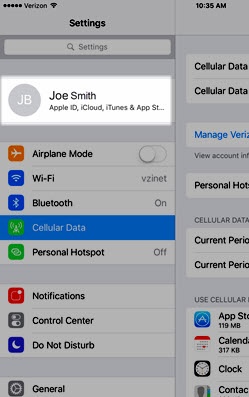
- From a Home screen on your Apple® iPad®, tapSettings
.
- Tap your Apple profile (at the top).
- TapiCloud.If prompted, enter the Apple ID and password then tapSign In.
- TapPhotosthen tap theSync this iPad switchto turn on
or off
.
While enabled, do the following:- Select one of the following options:Selected when a checkmark is present.
- Optimize iPad Storage
- Download and Keep Originals
- If applicable, tap theUpload to My Photo Stream switchto turn on or off.
- Tap theShared Albums switchto turn on or off.
- TapiCloudto return to the previous screen.
- Tap the preferred switches to turn the available backup options (e.g., Mail, Contacts, Messages, etc.) on or off.If necessary, tapShow All.
- TapPasswords and Keychain.
- Tap theSynch this iPad switchto turn on or off.Keeps passwords and credit card info saved on the devices you approve.
- TapBackthen tapiCloud(upper-left) to return to the previous screen.
- TapiCloud Backupthen tap theBack Up This iPad switchto turn on or off.TapBack Up Nowto complete a manual backup.

For additional info on iCloud®, check out this Apple Support page.
iPadOS 15.7 or earlier
- From a Home screen on your Apple® iPad®, tapSettings
- Tap your Apple profile (at the top).
- TapiCloud.If prompted, enter the Apple ID and password then tapSign In.
- TapPhotosthen tap theiCloud Photos switchto turn onWhile enabled, do the following:
- Select one of the following options:Selected when a checkmark is present.
- Optimize iPad Storage
- Download and Keep Originals
- If applicable, tap theUpload to My Photo Stream switchto turn on or off.
- Tap theShared Albums switchto turn on or off.
- TapiCloudto return to the previous screen.
- Tap the preferred switches to turn the available backup options (e.g., Mail, Contacts, Messages, etc.) on or off.
- TapKeychain.
- Tap theiCloud Keychain switchto turn on or off.Keeps passwords and credit card info saved on the devices you approve.
- TapiCloudto return to the previous screen.
- TapiCloud Backupthen tap theiCloud Backup switchto turn on or off.TapBack Up Nowto complete a manual backup.
For additional info on iCloud®, check out this Apple Support page.