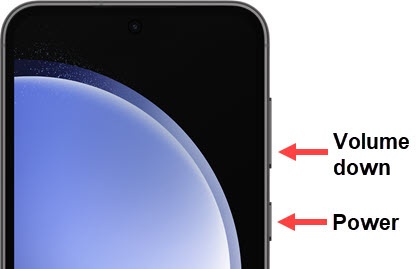
Samsung Galaxy S23 FE - Capture a Screenshot
Here's how to capture a screenshot on your Galaxy S23 FE.
- To capture a screenshot, simultaneously press then release theVolume downandSide buttons.
- Once you capture a screenshot you'll be presented with the following options:If no option is selected, the image automatically saves in the Gallery.
- Smart CaptureAllows you to capture parts of the screen that are hidden.
- Crop
- Tag
- Share
- After making the desired changes to the screenshot, tap one of the following:
- Share
- Save
To view the screenshot you've taken, swipe up from the center of the display on a Home screen then navigate:.GalleryAlbumsScreenshots