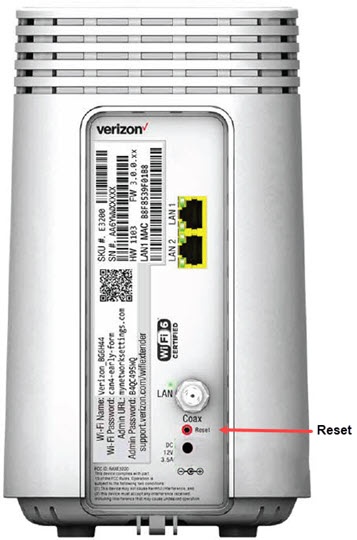
Wi-Fi Extender (E3200) - Factory Reset
Here's how to reset the Wi-Fi Extender (E3200) to the factory default settings.
Positioning a Restore Settings to Factory Defaults for Troubleshooting:
- "The next step in our resolution process is to place your device back to the factory settings."
- "This helps us further test and understand what might be causing the problem."
A reset to factory default deletes all changes made to the configuration and connected clients (e.g., Network Name (SSID), Wi-Fi/Admin Password, etc.) need to reconnect.
- From the back of the router, locate the Reset pin hole.
- Insert a paper clip then press and hold theReset buttonfor at least 10 seconds with the router powered on.