Verizon Router - View Network Name and Password
Here's how to view the Wi-Fi name and password for your Verizon Router.
- Wi-Fi Name (SSID): The name that identifies the wireless network.
- Wi-Fi Password: The password that's needed to connect to the Wi-Fi network.
The Wi-Fi name and Wi-Fi password can be viewed via the Admin Page or from the device.
View via Admin Page
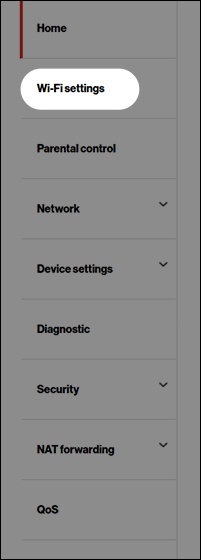
- Access the router admin page.Refer to Admin WebGUI for assistance.
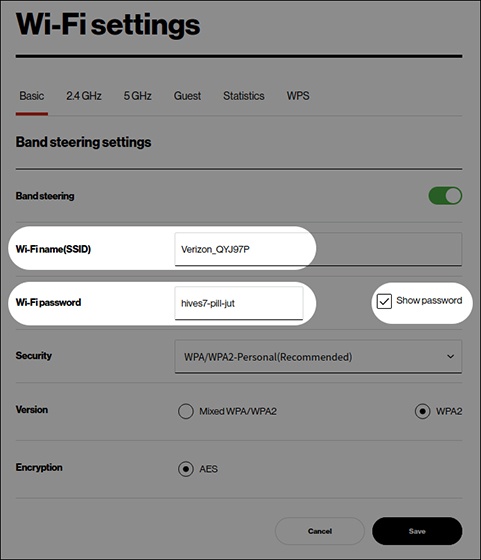
- From the 'Basic' tab, view the 'Wi-Fi name (SSID)' or 'Wi-Fi password'.If necessary, select (check) the 'Show password' box.
View via Device
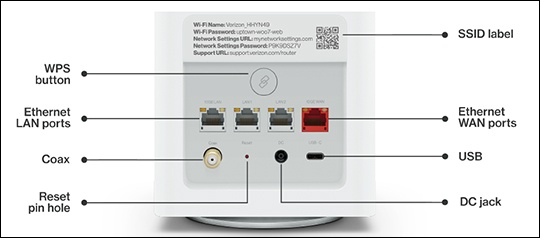
- Place the router face down on a flat surface.
- From the back of the router, view the default 'W-Fi Name' or 'Wi-Fi Password' on the label.The network name and password are located to the left of the QR code, below the barcodes.