GizmoWatch 2 - Add a Nearby Gizmo Buddy via Bluetooth
Here's how to add a nearby Gizmo Buddy using Bluetooth on your GizmoWatch 2.
- GizmoWatch 2 is designed to work in conjunction with the GizmoHub smartphone app of the caregiver or guardian.
- All Gizmo Watch models can have Gizmo buddies added in the GizmoHub app, but only Gizmo Watch 3 and GizmoWatch 2 can find another nearby Gizmo to make a Gizmo buddy request.
- Prior to adding your Gizmo buddy via Bluetooth®, ensure:
- Both Gizmos are in the same room.
- Both Gizmos are powered on.
- The GizmoHub app is updated from either the Apple® App Store® or Google Play™ Store.
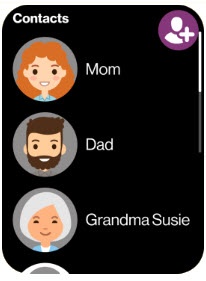
- Swipe left or right from the main screen to access the 'Contacts' screen.
- Tap theAdd Contact icon
(top-right).
- From the 'Ask your buddy to add you too' screen, tap theCheckmark icon
.
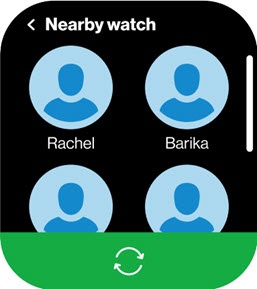
You and your buddy have to add each other at the same time. - When your GizmoWatch 2 finds your buddy, tap their icon.A buddy request is sent to the GizmoHub app for each buddy’s guardian to approve.
- On the phone, open theGizmoHub app
.
If presented with the PIN screen, enter your PIN. - From the 'Dashboard' tab, tap theNotifications icon
(upper-right).
- From the 'Invitations & Requests' section, tapAccept.To decline, tapDecline.