KYOCERA DuraForce PRO 3 - Uninstall Apps
Here's how to remove or delete apps if your DuraForce PRO 3 is unresponsive, freezes or an app won't open.
- Apps included with the Android™ operating system may not have an uninstall option.Some apps that can't be uninstalled can be disabled (disabling apps may cause related apps to malfunction).
- If uninstalling an app update, ensure auto-update is disabled for the specified app until the issue is resolved with the developer.
- From a Home screen, swipe up to display all apps.
- Navigate:.SettingsApps
- TapSee all 'xx' apps.
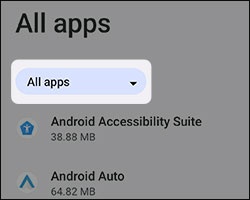
- If available, tapAll apps(upper-left).
- Locate then select the appropriate app.If system apps aren't visible, tap theMenu icon
(upper-right) then tap
Show system. - Do one of the following:
- To uninstall the app:
- TapUninstall.
- Review the notification then tapOKto confirm.
- To uninstall app updates:This option is only available when an update has been installed.
- Tap theMenu icon
- TapUninstall updates.
- Review the notification then tapOKto confirm.