KYOCERA DuraForce PRO 3 - Enable / Disable App
Here's how to turn pre-installed apps on your DuraForce PRO 3 on or off.
Some apps that come pre-installed (e.g., calculator, Google Play™ Store, Verizon Cloud, Call Filter, etc.) on your Android™ device can't be uninstalled; however, they can be disabled (turned off) so they don't appear in the list of apps on your device.
The option to enable or disable an app may only be available for apps that can't be uninstalled.
Enable App
- From a Home screen, swipe up to display all apps.
- Navigate:.SettingsApps
- TapSee all 'xx' apps.
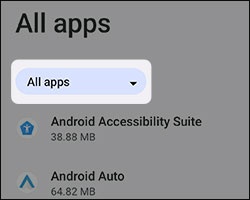
- TapAll apps(at the top).
- TapDisabled apps.
- Tap the appropriate app.
- TapENABLE.

Disable App
Disabling an app may cause related apps to function improperly.
- From a Home screen, swipe up to display all apps.
- Navigate:.SettingsApps
- TapSee all 'xx' apps.
- Tap the appropriate app.
- TapDISABLE.If the Disable option isn't available, navigate:.
- TapDISABLE APP.