Enable / Disable Voice Isolation - Apple iOS
Here's how to turn Voice Isolation for your iPhone / iPad on or off.
This feature is only available on Apple devices on iOS 16.4 or later.
- The Voice Isolation mode prioritizes your voice in a call and blocks out the ambient noise.
- For additional Voice Isolation info while using FaceTime, check out this Apple Support page.
Enable
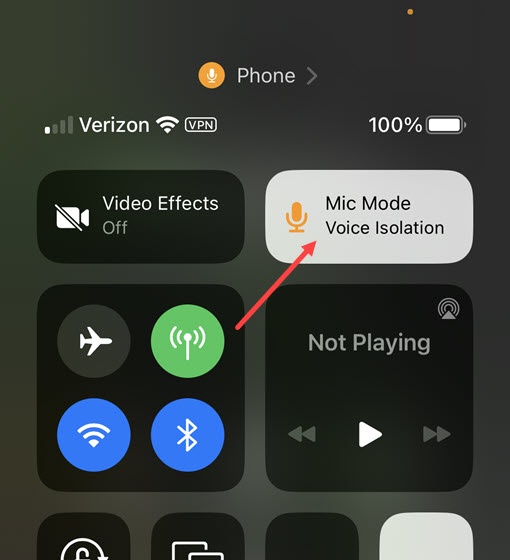
- While on a phone call, open theControl Centeron the device.To open theControl Center, do one of the following:
- Device with Face ID: Swipe down from the top-right edge.
- Device with a Home button: Swipe up from the bottom.
- TapMic Mode.
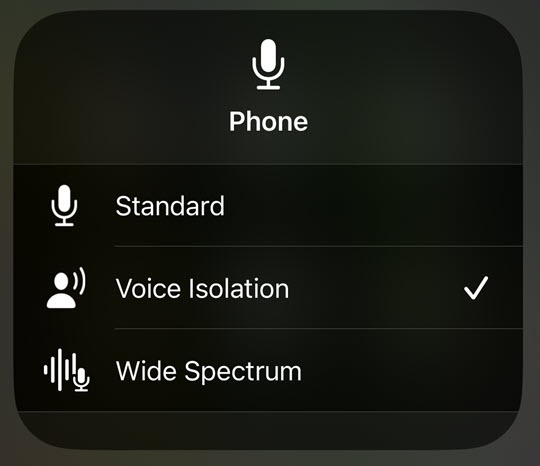
- TapVoice Isolation.Wide Spectrum is currently not available for cellular calls.
Disable
- While on a phone call, open theControl Centeron the device.To open theControl Center, do one of the following:
- Device with Face ID: Swipe down from the top-right edge.
- Device with a Home button: Swipe up from the bottom.
- TapMic Mode.
- TapStandard.Wide Spectrum is currently not available for cellular calls.