Volume Controls - KYOCERA DuraXV Extreme+
Here's how to adjust the volume if your DuraXV Extreme+ doesn't vibrate or play sounds when receiving calls / messages.
Adjusting volume controls can help if you're not getting notifications, ringing, vibrating when receiving calls, texts and/or emails.
The volume can be adjusted via the Volume buttons or the Sound settings menu.
Volume Buttons
Use the Volume Buttons to adjust: 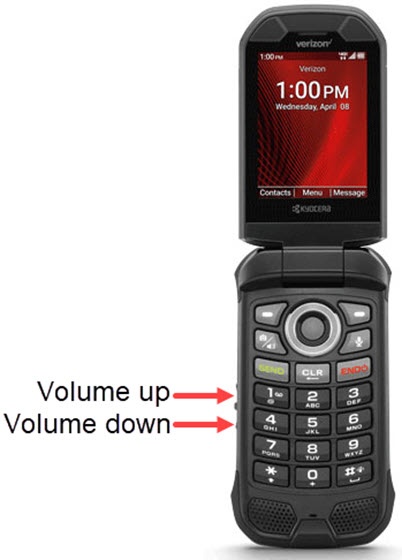
- earpiece volume while on a call.
- media volume while listening to music or playing videos.
- ringtone volume when not on a call or listening to music or playing videos.
Sound Settings Menu
- From the main screen, selectMenu.Utilize the 5-way navigation pad to highlight and the center button to select.
- SelectSettings & tools.
- SelectSettings.
- SelectSound settings.
- SelectVolume.
- Press the left side of the navigation pad to decrease volume or the right side of the navigation pad to increase volume then selectSet.