Verizon Receiver (LV65) - View LED Status Indicators
Here's how to identify the LED light status indicators on the Verizon Receiver (LV65).
- The LED indicator is located on the front of the Verizon Receiver (LV65) in the top right corner.
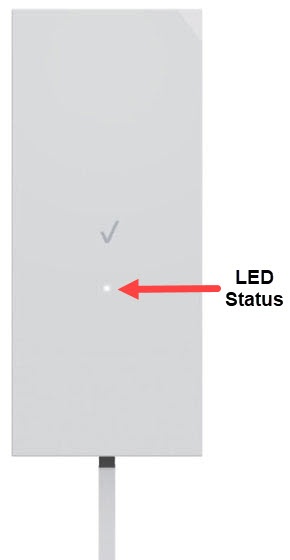
Receiver LED Definition
Mode | StatusStatus | LED Pattern |
|---|---|---|
Boot up | -- | Blinking white |
Unpaired mode | -- | Blinking blue |
Operation mode | No 5G signal | Solid red |
5G signal confirmed | Solid white | |
Other | FW error | Blinking red |
FW update | Blinking white |
Power Adapter LED Definition
Mode | StatusStatus | Router LED Pattern | Receiver LED Pattern |
|---|---|---|---|
AC power connected | The Router LED will turn white only if the AC power cord is connected to a power outlet. | White | -- |
Receiver connected | The Receiver LED will turn white only if the Receiver is connected to the port. | -- | White |
No AC power connection | If the power cord is not connected to a power outlet, these two LED will not light up. | Off | Off |
No Receiver connection | If the Receiver is not connected or if it’s connected to the wrong port, the Receiver LED will not light up. | -- | Off |