Session status messages
Session Status

Due to inactivity, your session will end in approximately 2 minutes. Extend your session by clicking OK below.

Due to inactivity, your session has expired. Please sign in again to continue.

TCL TAB Disney Edition - Capture a Screenshot

2026-10-22 20:09:11.459

TCL TAB Disney Edition - Capture a Screenshot

Here's how to capture a screenshot on your TCL TAB Disney Edition.
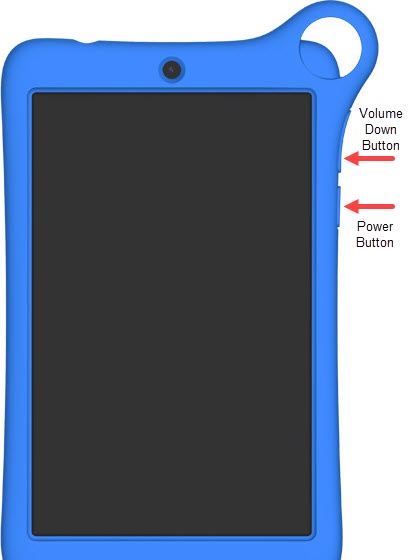
  1. To capture a screenshot, simultaneously press then quickly release the
    Power
    and
    Volume Down buttons
    .
  2. To view the screenshot you've taken, swipe up to view all apps then navigate:
    Photos Google Photos Icon
    Library
    Screenshots
    .
    Power and Volume Down button