Windows 11 - View SIM Card Number
Here's how to view the number for the SIM card associated with your Windows 11 device.
If your device isn't running Windows® 11, refer to the Windows 10 instructions.
- From the Windows desktop, navigate:(left-panel).StartSettingsNetwork & internet
- Tap or clickCellular.
- Tap or clickMobile operator settings.
- From the Properties section, view the SIM ICCID.

You can also remove the SIM card and view the 20-digit SIM card number (with the gold contacts facing away). 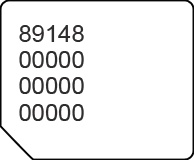
Not available on all Windows 11 devices.