TCL FLIP Pro - Activate / Set Up Device
Here's how to quickly set up your FLIP Pro.
To avoid potential issues, don't remove or swap the pre-inserted SIM card.
For info on prepaid service activation, refer to Set up Verizon Prepaid Service.
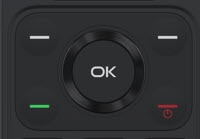
- From the main screen, selectEnglish.Utilize the 5-way navigation pad to highlight and press the OK button to select.
- To continue, press theright soft key
to choose Done.
If prompted for Account PIN or SSN, enter the required info. - To continue after successful activation, press theright soft keyto choose Next.
- From the 'Terms and Privacy Policy screen, press theright soft keyto choose Next.
- From the 'Setup Complete' prompt, selectOk.