TCL FLIP Pro - Adjust Brightness / Display Settings
Here's how to adjust screen brightness and font size for your FLIP Pro.
Follow these steps to adjust brightness settings and display / font settings.
Adjust Brightness Settings
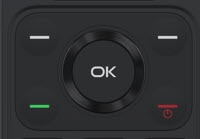
- From the main screen, press theOK button.Utilize the 5-way navigation pad to highlight and the OK button to select.
- SelectSettings.
- SelectDisplay(under the 'Personalization' section).
- SelectBrightnessthen adjust the slider as preferred.
Adjust Display / Font Settings
- From the main screen, selectMenu.Utilize the 5-way navigation pad to highlight and the OK button to select.
- SelectSettings.
- SelectDisplay(under the 'Personalization' section).
- SelectLarge Text, then select On or Off.