Apple iPhone - Enable / Disable eSIM Profile
Here's how to verify your eSIM profile is on or off on your iPhone.
- The steps below apply to the following Apple® iPhone® models:
- iPhone XS / XS Max and newer models
- iPhone SE (3rd Gen)
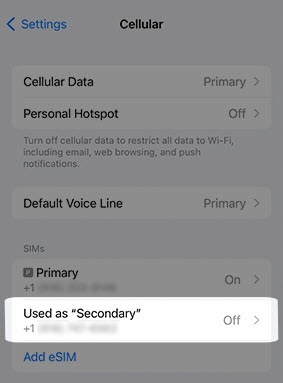
- From a Home screen, navigate:SettingsCellular
- From the 'SIMs' section, tap the line for the eSIM.If no plan is listed and 'Add eSIMs' is the only option, contact Customer Service at (800) 922-0204 to have a eSIM profile reserved for your device.
- Then do one of the following:
- To turn on:
- TapTurn On This Line switchto turn on
.
- To turn off:
- Tap theTurn On This Line switchto turn off
.
This option is only available when both the physical SIM card and eSIM are activated.

For additional Dual SIM info, check out this Apple article.