Samsung Galaxy Book Go 5G - Activate / Set Up Device
Here's how to quickly set up your Galaxy Book Go 5G.
Your Galaxy Book Go 5G:
- can activate cellular service using an eSIM or physical SIM.Only 1 SIM can be active at a time.
- will ship without a physical SIM card.If performing first time (out-of-the-box) setup and a physical SIM card is preferred, ensure:
- you're in a Verizon coverage area.
- a 5G SIM card is inserted then select the SIM as the default cellular data number after setup is complete.To avoid potential activation / service issues, don't insert a 4G SIM card.
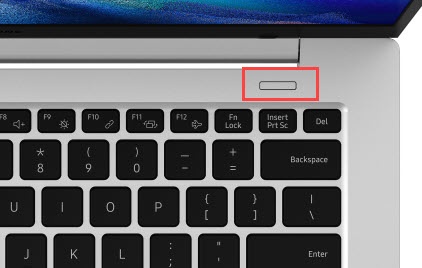
- If powered off, from the keyboard press thePower button.
- Select a country or region then clickYes.
- Select the preferred keyboard layout then clickYes.
- From the 'Want to add a second keyboard layout' screen clickSkip.
- Select the preferred network, clickConnectthen clickNext.If prompted, enter the network security key (Wi-Fi password) then clickNext.If you choose 'I don't have internet', you can add Wi-Fi networks after the setup is complete.
- To continue, review the Windows License Agreement then clickAccept.
- From the 'Let's name your device' screen, enter a name then clickNext
- To sign in with Microsoft, clickSign inthen enter an email address, phone or Skype account and clickNext.If prompted, enter the password then clickNext.
- If prompted with 'Select a device to restore from', select the preferred option:
- Restore from this PC
- Set up as a new PCIf troubleshooting, choose this option and don't restore the device until all testing has been completed.
- ClickCreate PIN.
- Enter a PIN, re-enter the PIN then clickOK.
- From the 'Choose privacy settings for your device' screen, adjust as desired then clickAccept:ClickLearn moreto review info about each setting.
- From the 'Let's customize your experience' screen, select (check) the preferred experience then clickAccept.
- From 'Use your Android phone from your PC' clickSkip.
- Allow a few minutes for the device to complete setup.
- To connect your Galaxy Book Go 5G to the Verizon network, add a cellular plan.