Orbic Myra 5G - Use Multi Window
Here's how to use two apps simultaneously on your Orbic Myra 5G.
- 'Multi window' is also referred to as split screen.
- The 'Multi window' function allows multiple apps to be run on the current screen at the same time.
- Not all apps on your Orbic® Myra 5G™ support 'Multi window'.
- From a Home screen, tap theRecent apps icon
to view all open apps.
- Scroll left or right to locate the preferred app.
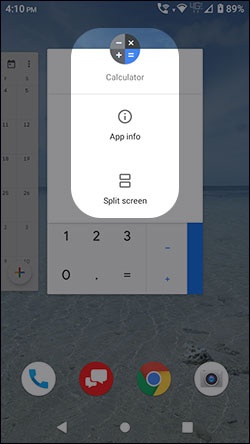
- Tap the app icon (e.g., Chrome, Settings, Camera, etc.) (at the top of the panel) then tapSplit screen.Options may vary depending on the app selected.The image below is an example.
- From the 'Recent apps' screen, tap the second app to be viewed.To change to a different app, tap theApps icon
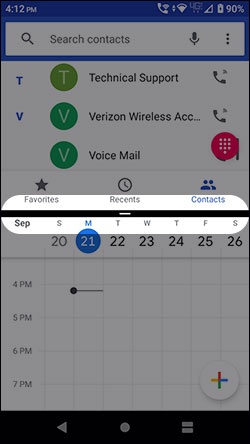
(lower-right) then tap the appropriate app. To close the split screen view slide the horizontal bar all the way up or down.
Adjust the size of the apps by sliding the horizontal bar between the apps up or down.The image below is an example.