Samsung Galaxy A12 - Volume Controls
Here's how to manage volume controls if your Galaxy A12 doesn't vibrate or make sounds.
Adjusting volume controls can help if you're not getting notifications, sounds or vibrations when receiving texts or emails.
- From a Home screen, swipe up to access the apps screen.
- Navigate:.SettingsSounds and vibration
- TapVolume.
- Adjust any of the following:Drag the slider left or right to adjust the level. If unavailable, ensure the Do not disturb switch and the Mute all sounds switch is turned off.
- Ringtone
- Media
- NotificationsIf unavailable, ensure the ringtone setting is on.
- SystemIf unavailable, ensure the ringtone setting is on.

The volume can also be adjusted by pressing the 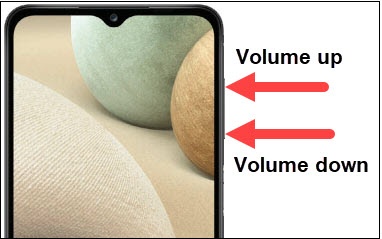
Volume buttons
(right edge) up or down.