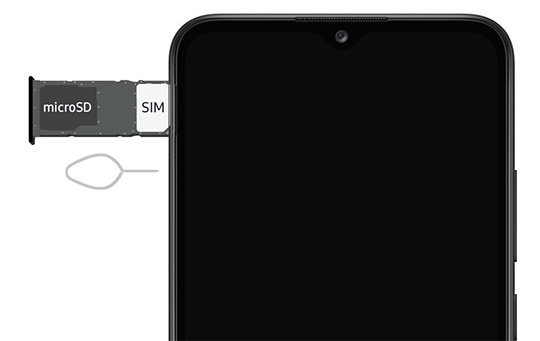
Samsung Galaxy A02s - Insert or Remove SD / Memory Card
Here's how to insert or remove an SD / memory card for your Galaxy A02s.
- This device supports microSD (TransFlash) memory cards which can be purchased from any Verizon store or online.
- For best results, Samsung recommends using a class 10, UHS class 1, 3 or newer memory card.
- Ensure that the device is powered off.
- From the upper-left edge of the device (display facing up), remove the card tray.Utilize the insertion / removal tool (or a paperclip) to unlock the tray by inserting it into the provided slot then remove the tray.
- Do one of the following:
- Insert SD / memory cardWith the gold contacts facing down, insert the SD / memory card into the tray.
- Remove SD / memory cardFrom the bottom of the card, carefully lift to remove. To assist, use the opening on the opposite side of the tray to dislodge (using a fingernail or similar tool).