Session status messages
Session Status

Due to inactivity, your session will end in approximately 2 minutes. Extend your session by clicking OK below.

Due to inactivity, your session has expired. Please sign in again to continue.

GizmoWatch Disney Edition - Volume Controls

2026-10-22 18:18:32.388

GizmoWatch Disney Edition - Volume Controls

Here's how to adjust the volume on your GizmoWatch Disney Edition.
If you need to adjust the volume for your child's GizmoWatch Disney Edition, follow these step-by-step instructions.
  1. From the Home screen, swipe left then tap the
    Settings icon
    Settings icon.
  2. Tap the
    Volume icon
    Sound icon (upper-left).
  3. Drag the
    slider
    left or right to decrease / increase volume.
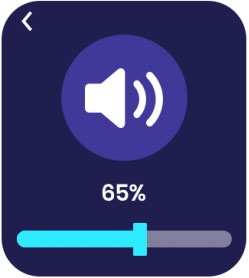
    Adjust Volume slider