MOTOROLA ONE 5G UW - View / Extend Battery Life
Here's how to extend battery life, view charging status / remaining battery and determine what uses the most power on your Motorola one 5G UW.
- Battery life is measured by standby time and talk time.
- Standby time is the amount of time the device stays powered on with no voice, data, or other usage.
- Talk time is based on voice usage.
- Using data such as web browsing, apps or streaming reduces overall talk time.
- Apps and processes are listed from highest to lowest percentage of power consumption. Review any high or unusual battery drain.
- From a Home screen, swipe up from the middle to display all apps.
- Navigate:.SettingsBattery
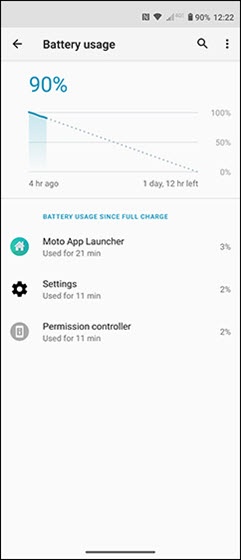
- From Battery, tap theUSAGE DETAILSto view 'Battery usage' status.
- View the 'Battery usage' details.The Battery history graph displays the time since it was last charged to 100%.

To improve battery life, you can:
- Contact the app developer if an app appears to cause excessive battery drain.
- Ensure Power Saver Settings are enabled.
- Adjust brightness to lowest setting.
- Turn off GPS when not in use.If disabled, certain apps or services may not work properly.
- Turn off vibrate mode if not used.
- Ensure battery optimizations aren't ignored; make sure accounts (e.g., email, Facebook®, etc.) are selected and optimized as desired.
- Remove widgets that automatically update.