Pixel 5 - Common Camera Settings
Here's info on common camera settings (e.g., flash, timer, front / rear camera, etc.) for your Pixel 5.
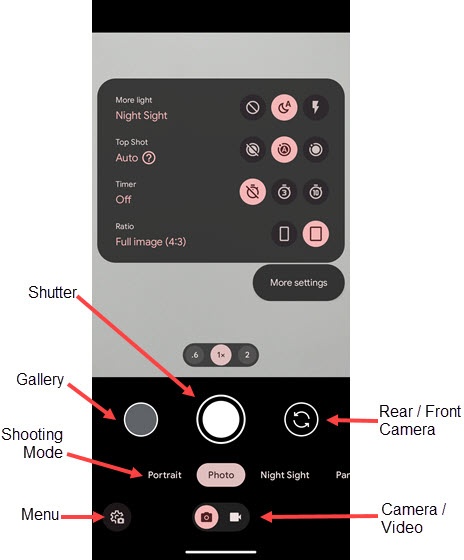
Settings
- From a Home screen, tap theCamera icon(at the bottom).
- Tap theMenu icon
.
If unavailable, tap the 'Night Sight' icon(lower-left).
- TapMore Settings.
- Tap to select an option or turn on
or off
:
- General
- Save location
- Camera sounds
- Google Lens suggestions
- Advanced
- Composition
- Framing hints
- GridTap to select an option.
- Manual Controls
- Exposure
- Photo
- Camera photo resolutionTap to select an option.
- Save selfie as previewed
- Video
- Video stabilization
- Audio Zoom
- Help & feedback
- Send feedback
- Help
Top Shot
- From a Home screen, tap theCamera icon(at the bottom).
- Tap theMenu iconIf unavailable, tap the 'Night Sight' icon
- Tap one of the following Top Shot icons:
- Top Shot off
- Top Shot auto
- Top Shot on


Timer
- From a Home screen, tap theCamera icon(at the bottom).
- Tap theMenu iconIf unavailable, tap the 'Night Sight' icon
- Tap one of the following Timer icons:
- Off
- 3 sec
- 10 sec

More Light
- From a Home screen, tap theCamera icon(at the bottom).
- Tap theMenu iconIf unavailable, tap the 'Night Sight' icon
- Tap one of the following 'more light' icons:
- None
- Night Sight
- Flash on


Rear or Front Facing Camera
- From a Home screen, tap theCamera icon(at the bottom).
- Tap theCamera Facing icon
to switch between rear and front camera.
Shutter
- From a Home screen, tap theCamera icon(at the bottom).
- Tap to take a picture in camera mode or record video in video mode.
Gallery
- From a Home screen, tap theCamera icon(at the bottom).
- Tap to access photo gallery.
Shooting Mode
- From a Home screen, tap theCamera icon
(at the bottom).
- Tap theCamera / Video switchto change from Photo Mode
to Video Mode
.
- Scroll left or right then tap a shooting mode option
- Photo Mode
- Photo
- Long Exposure
- Portrait
- Night Sight
- Panorama
- Photo Sphere
- Video Mode
- Video
- Pan
- Slow Motion
- Time Lapse