Apple iPhone - Turn Call Blocking & Identification On / Off
Here's how to turn Call Blocking & Identification on or off to silence calls from unknown numbers on your iPhone.
Calls identified by Verizon as intentional spam or fraud are silenced and automatically sent to voicemail. The Call Filter App must be installed for full functionality.
- From a Home screen on your Apple® iPhone®, tapSettings
.
If an app isn't available on your Home screen, swipe left to access the App Library. - TapPhone.
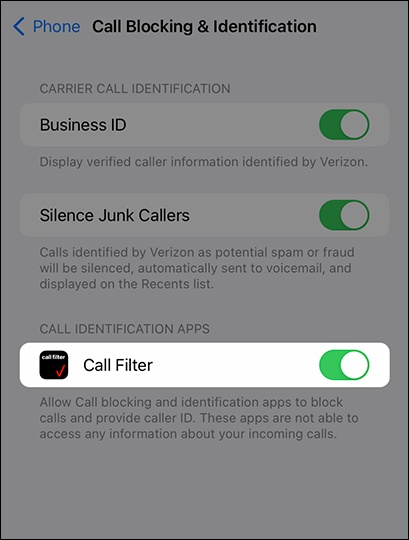
- TapCall Blocking & Identification.
- Tap theSilence Junk Callers switchon
or off
.
If an emergency call is placed, Silence Unknown Callers will be temporarily disabled for the next 24 hours. - From the 'Call Identification Apps' section, tap the applicable switch next to the desired app to turn on or off.This setting will allow call blocking and identification apps to block calls and provide caller ID.
For additional ways to detect and block spam calls, check out this Apple Support page.