Remove Disney Bundle - My Verizon Website
Here's how to cancel your Disney Bundle subscription via the My Verizon website.
If the Disney Bundle is removed on or after December 8, 2022, it can't be re-added unless included with select Verizon Unlimited plans. Refer to the Disney Bundle FAQs for more info.
Only the Account Owner or Manager can perform these steps; here's additional info on account roles.
- From a web browser, sign in to My Verizon.
- From the My Verizon Home page, navigate: .If accessing from a mobile browser, select theMenu icon
(upper-right) then navigate: .
- Select .
- From the 'Manage Services & Perks' section, select theMore icon
in the 'Disney Bundle' section.
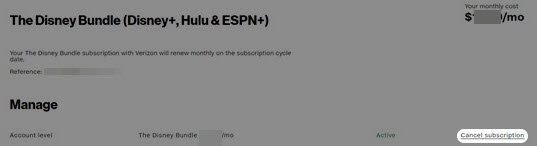
If necessary, selectSee Allfrom the 'Manage Services & Perks' section then from the 'Disney Bundle' section, selectManage. - From the 'Manage' section, selectCancel subscription.
- To proceed, review the message then selectRemove Disney Bundle.It may take up to 24 hours for these changes to take effect.