Orbic Journey L - Volume Controls
Here's how to adjust the volume if your Journey L doesn't vibrate or play sounds when receiving calls / messages.
Pressing the Volume buttons (left-edge) up or down adjusts:
- earpiece volume while on a call.
- media volume while listening to music or playing videos.
- ringtone volume when not on a call and no media apps are actively used.
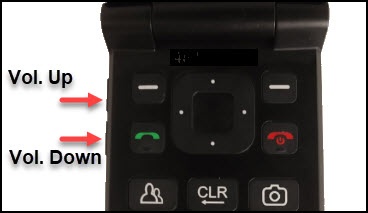
To adjust volume settings on your Orbic® Journey™ L when not on a call do the following:
- From the main screen, selectMenu.Utilize the 5-way navigation pad to highlight and the center button to select.
- Navigate:Settings
>
Sound settings. - Adjust any of the following:
- Master volume
- Also vibrate for calls
- Phone ringtone
- Vibration pattern
- Notification sound
- Alarm sound
- Keypad volume
- Keypad tone
- Vibrate on keypress
- Battery charging tone
- Battery charged tone
- Emergency tone