Google Pixel Phones - Dual SIM Dual Standby - Switch SMS / MMS Number
Here's how to change which phone number your messages are sent from on your dual SIM capable Pixel smartphone.
The following Pixel phones don't support Dual SIM Dual Standby (DSDS):
- Pixel Phone by Google
- Pixel 2 / 2XL
- Pixel 3 / 3XL
- Pixel 3a / 3aXL
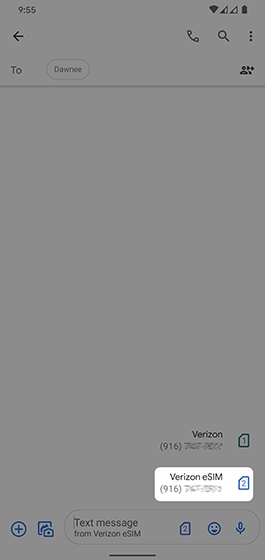
You can send SMS / MMS messages using either mobile number. To switch numbers before sending a message, follow the instructions below:
- From a Home screen, swipe up from the middle to display all apps.
- TapMessages
.
- From the Inbox, tapStart chat(lower-right).If necessary, tap theBack icon
(upper-left) to navigate to the Inbox.
- From the 'To' field, enter a 10-digit mobile number or a contact name.As the number or contact is entered, a matching contact may appear and can be selected at any time.
- From the 'Text message' field, tap theNumbered Page icon
.
- Tap the line you want to use to send the message from (name varies; example Verizon eSIM).This option is only available when both the physical SIM card and eSIM are activated.
- Enter the message, then tap theSend icon
(on the right).