Google Pixel Phones - Dual SIM Dual Standby - Set Calling SIM by Contact
Here's how to designate which calling SIM your dual Sim capable Pixel smartphone uses to communicate with specific contacts.
The following Pixel phones don't support Dual SIM Dual Standby (DSDS):
- Pixel Phone by Google
- Pixel 2 / 2XL
- Pixel 3 / 3XL
- Pixel 3a / 3aXL
- From a Home screen, tap thePhone icon
(lower-left).
If unavailable, swipe up from the middle to display all apps then tapPhone. - Tap theContacts tab
(bottom of the screen).
- Tap the preferred contact.
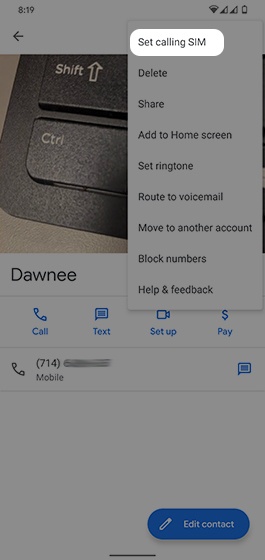
- TapMenu icon
(upper-right).
- TapSet calling SIM.This option is only available when both the physical SIM card and eSIM are activated.
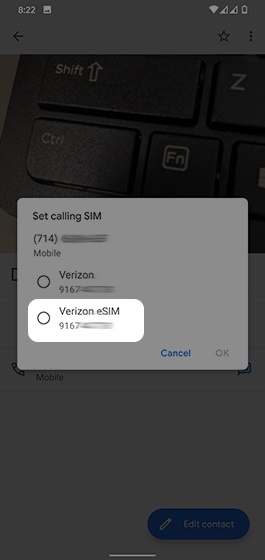
- From the 'Set calling SIM' screen, tap the number you want to use with that contact (name varies; example Verizon eSIM).
- TapOK.