Care Smart app - Add a Location Alert
Here's how to add location alerts via the Care Smart app.
- This content is only available for the Care Smart watch.
- Ensure the Care Smart app is updated (Google Play™ Store or Apple® App Store®).
- Check out these Care Smart FAQs for more info.
- The Care Smart app supports two types of location alerts for Apple Watch, location-based alerts and time-based alerts.
- Location-based (geofence) alerts notify you when the Apple Watch moves into or out of a specific area.
- Time-based (scheduled) alerts notify you of the Apple Watch’s time range.
Location-Based Alerts
- Open theCare Smart app.If presented with the PIN screen, enter your PIN.
- TapDevices(lower-left).
- TapAdd a location alert.
- TapLocation-based.Sends notifications when the watch moves in or out of a specified area.
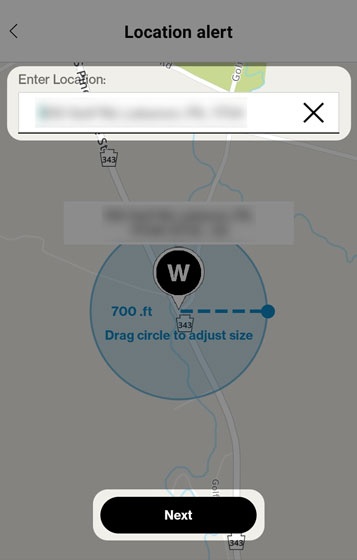
- Enter a location in the top field, drag the circle to adjust boundary then tapNext.Search results populate for accuracy.
- In the 'Name this Place' field, type a description of the location (e.g., School, Home, etc.)
- Select a timeframe in which you'd like to receive Location-based alerts (e.g., 7:00AM to 6:00PM). For Care Smart Watch, the timeframe should not exceed 8 hours from start to end.For Apple Watch:
- Geofence can't be less than 60 minutes.
- Geofence can't carry over midnight.
- Select the days of the week you'd like to receive Location-based alerts.
- TapSave.

Time-Based Alerts
- Open theCare Smart app.If presented with the PIN screen, enter your PIN.
- TapDevices(lower-left).
- TapAdd a location alert.
- TapTime-based.Sends notifications during specific times of day.
- Choose one of the following options:
- Specific Time (only available for Care Smart Watch)Sends notifications at a certain time and day of the week.
- Time RangeSends notifications throughout an entire range of dates and times.For Apple Watch:Min time range is 1 hours.Scheduled locations cant carry over midnight (i.e 12:00am-11:59pm)
- Enter time(s) and date(s) then tapSave.