LG V60 ThinQ 5G UW - Common Camera Settings
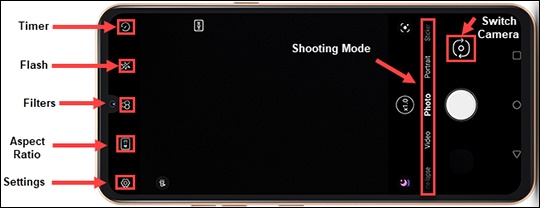
Here's info on common camera settings (e.g., flash, timer, front / rear camera, etc.) for your V60 ThinQ 5G UW.
For additional support, refer to the 'Camera features' section of your user guide.
HDR Mode
HDR (High Dynamic Range) combines photos or videos taken at different exposures for one optimal photo or video.
- From a Home screen, tap theCamera icon
.
These instructions apply to Home mode only. - Tap theSettings icon
.
- TapHDRto select an option (On, Off or Auto).
Timer
- From a Home screen, tap theCamera iconThese instructions apply to Home mode only.
- Tap theTimer icon
.
A number displays showing the amount of time before a picture is taken.
Flash
- From a Home screen, tap theCamera iconThese instructions apply to Home mode only.
- Tap theFlash icon
to select an option (On, Off, Auto).
Switch Camera
- From a Home screen, tap theCamera iconThese instructions apply to Home mode only.
- Tap theCamera Facing icon
to switch between front and rear cameras.
Storage
- From a Home screen, tap theCamera iconThese instructions apply to Home mode only.
- Tap theSettings icon
- TapStorage.This option is only available if an SD / memory card is inserted.
- Select an option:
- SD Card
- Internal
Shooting Mode
- From a Home screen, tap theCamera iconThese instructions apply to Home mode only.
- Swipe through the shooting modes then tapMore(right of Manual Camera).
- Select the desired option (e.g., Manual Video, Flash Jump-Cut, etc.).
Filters
- From a Home screen, tap theCamera iconThese instructions apply to Home mode only.
- Tap theFilters icon
.
- Select the desired option (e.g., Urban, Vivid, Violet, etc.).