Home Phone Base - LED Status Indicators
Here's the LED light status for your Home Phone Base.
The power button (with LED ring) is located on the back of the device.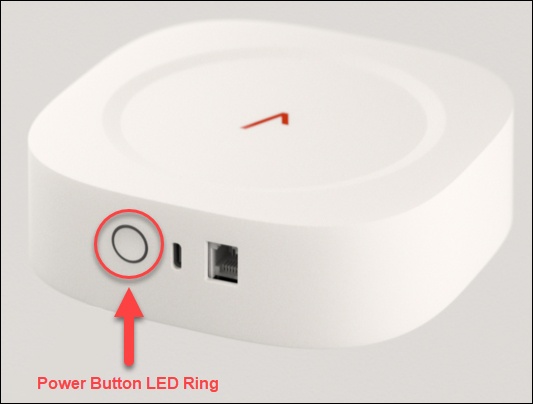
The LTE connection LED is located on the front of the device: 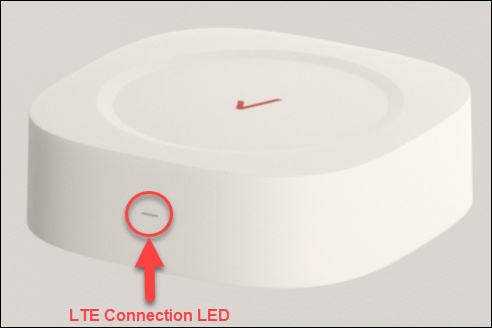
See the following table for explanations of what the LED colors and blink patterns mean:
Status | Power Button LED Ring | LTE Connection LED |
Pressed button (while power button is being pressed) | Solid Red Keep on until 1 second after power button release, then return to indicate battery status. | Not applicable |
No AC power and battery capacity is between 26-100% | OFF | Not applicable |
No AC power and battery is fully discharged | OFF | OFF |
Firmware Update (Triggered through app or automatic upgrade, when the device is plugged to AC power) (FOTA) | Not applicable | Rapid Blink White Blinks during the upgrade process |
Plugged to AC power and battery is charging | Soft Blink White | Not applicable |
Plugged to AC power and battery is fully charged | Solid White | Not applicable |
Hard reset / Reboot (after pressing power button and before shutting down) | Strong Blink (slow pulse) White (For 1-2 seconds) | Rapid Blink White (For 1-2 seconds) |
Powered OFF and plugged to AC power | Soft Blink White | OFF |
Connected to the server with high signal quality | Not applicable | Solid White |
Connected to the server with low signal quality | Not applicable | Solid Amber/Yellow |
No 4G signal | Not applicable | Solid Red |
Invalid or missing SIM card | Not applicable | Strong Blink Red |