Session status messages
Session Status

Due to inactivity, your session will end in approximately 2 minutes. Extend your session by clicking OK below.

Due to inactivity, your session has expired. Please sign in again to continue.

Place a Visual Voicemail Callback - Nokia

2026-10-22 18:06:21.891

Place a Visual Voicemail Callback - Nokia

Here's how to place a Visual Voicemail callback from your Nokia smartphone.
Visual Voicemail isn't available for Prepaid service.
  1. From the Home screen, swipe up then tap
    Voicemail
    Visual Voicemail app.
    If necessary, tap
    Verizon
    then tap
    Voicemail
    .
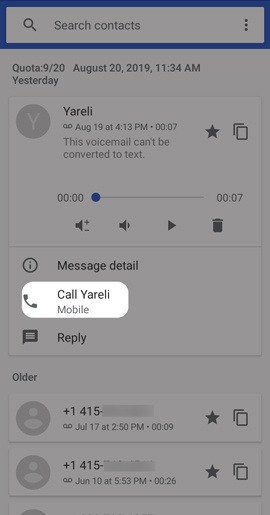
  2. From the Visual Voicemail inbox, tap a message.
  3. Tap
    Call
    .
    Voicemail Place Callback