5G Home Router - Change the Admin Password
Here's how to change the admin password to manage settings for the 5G Home Router.
- This content is for 5G Home Internet. For Fios Home Internet, click here.
- 5G Home Internet service is currently offered in specific areas; click here to check for 5G coverage availability.
This info doesn't apply to changing the password used to connect to the Router via Wi-Fi. The admin password is used to sign in to the device web interface to manage settings (e.g. network name, network password, etc.).
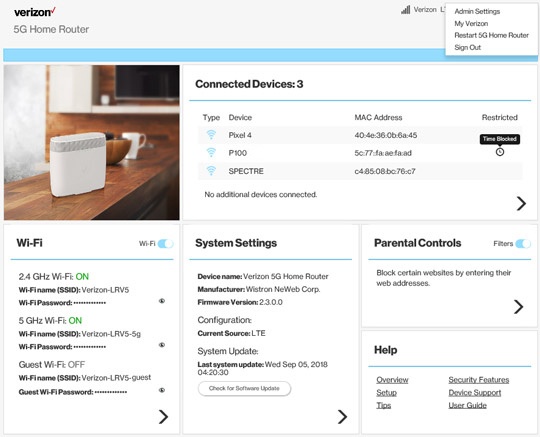
- Sign in to the Admin WebGUI.You must be connected to the 5G Home Internet network to access the admin page.
- From the Router Home screen, click theDropdown arrow
(upper-right) then click
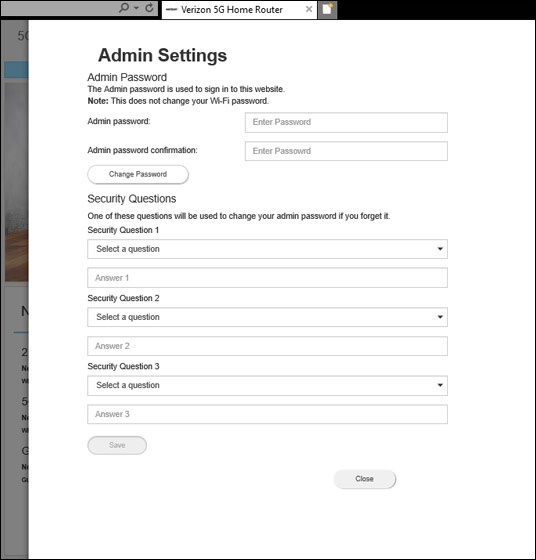
Admin Settings. - From Admin Settings, enter the the appropriate password into the following fields then clickChange Password:The password must be 8-32 characters.
- New password
- Confirm new password
- From Security Questions, select the appropriate security questions and enter the desired answers then clickSave.