Orbic® Journey™ V / Orbic Journey - Add a Wi-Fi Network
Here's how to connect your Journey V / Journey to a Wi-Fi network.
- From the main screen, selectMenu.Utilize the 5-way navigation pad to highlight and the center button to select.
- Navigate: .
- SelectWi-Fito turn on or off.
- Press theleft soft key
to 'Refresh' the Wi-Fi list.
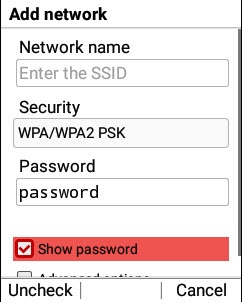
- Search for the desired network.If not found, press theright soft keyleft soft key:
- Wi-Fi name (SSID)
- Security
- Password
- Press theleft soft keyto choose 'Check' or 'Uncheck'.
- SelectConnect.