Sonim XP8 - Restart Device
Here's how to restart your Sonim XP8 if it crashes and resets, freezes or runs slowly.
Restarting your Sonim XP8® can help if you experience continuous resetting / rebooting, crashing, freezing, or if the touchscreen is unresponsive.
- Since this device has a non-removable battery, the restart (soft reset) process can be used to simulate a 'battery pull' when the device is unresponsive, frozen or doesn't power on.
- In rare cases, a restart could affect data (e.g., backup in progress, cached data, etc.).
Preferred Method
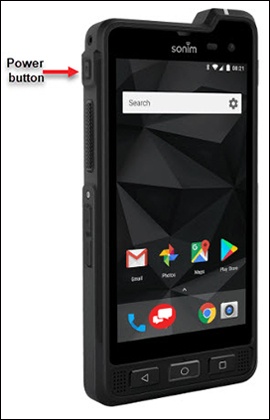
- Press and hold thePower button(left edge) until the 'options' menu appears then release.If the device is unresponsive, attempt the alternate method.
- TapRestart.If your device won't power back on, partially charge the device then retry.
Alternate Method
- Press and hold thePower button(left edge) until the device power cycles (approximately 10 seconds) then release.
- Allow several seconds for the reboot process to complete.If your device won't power back on, partially charge the device then retry.