Apple iPhone - Dual SIM with an eSIM - Change Line Before Calling a Number
Here's how to choose the desired line used before calling a number on your dual SIM capable iPhone.
If you need to select the mobile number used for phone calls prior to placing a call on your Dual SIM with an eSIM capable Apple® iPhone®, follow these step-by-step instructions.
- The steps below apply to the following Apple iPhone models:
- iPhone XS / XS Max and newer models
- iPhone SE (3rd Gen)
- To select which cellular plan is used when manually dialing a number, view the info below.
- From a Home screen, tap thePhone app
.
- TapKeypad(bottom of the screen).
- Enter a 10-digit mobile number.
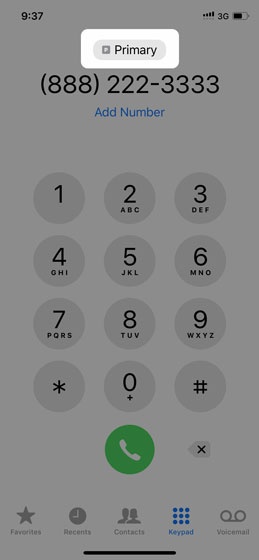
- Tap the current cellular plan (e.g., Primary, Secondary, etc.).This option is only available when using Dual SIM
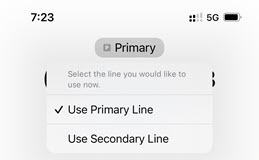
- Tap the desired cellular plan (e.g., Primary Line, Secondary Line, etc.).Selected when a checkmark is present.
- To place a call, tap theCall icon
.
For additional info, check out this Apple article.