Apple iPhone - Dual SIM with an eSIM - Label Cellular Plan
Here's how to label each cellular plan (e.g., Primary, Secondary, etc.) on your dual SIM capable iPhone.
If you need to add a customized label to one of the cellular plans on your Dual SIM with an eSIM capable Apple® iPhone®, follow these step-by-step instructions.
- The steps below apply to the following Apple iPhone models:
- iPhone XS / XS Max and newer models
- iPhone SE (3rd Gen)
- For additional Dual SIM info, check out this Apple article.
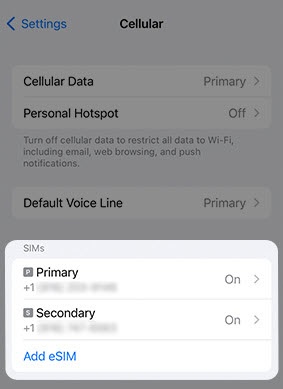
- From a Home screen, navigate:.SettingsCellularIf an app isn't available on your Home screen, swipe left to access the App Library.
- From the 'SIMs' section, tap the number you wish to label.This option is only available when using Dual SIM.
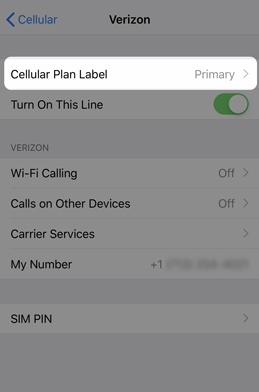
- TapCellular Plan Label.
- Choose one of the following options:
- Business
- Cellular Data
- Personal
- Primary
- Secondary
- Travel
- Custom Label (Type a name or number in the box)