Apple iPhone - Dual SIM with an eSIM - Change Default Cellular Data Number
Here's how to change the default mobile number used for cellular data on your dual SIM capable iPhone.
If you need to change the default mobile number used for cellular data on your Dual SIM with an eSIM capable Apple® iPhone®, follow these step-by-step instructions.
5G Ultra Wideband and 5G data connections are now supported while both the eSIM and physical SIM are activated with iOS 15 or later.
- The steps below apply to the following Apple iPhone models:
- iPhone XS / XS Max and newer models
- iPhone SE (3rd Gen)
- Only one mobile number can use cellular data at a time.
- From a Home screen, navigate:.SettingsCellularIf an app isn't available on your Home screen, swipe left to access the App Library.
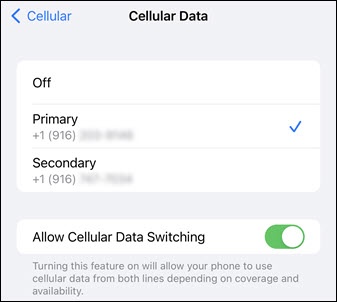
- TapCellular Data.This option is only available when there are two SIM profiles activated.
- Tap the number you'd like to use cellular data.If desired, turn Allow Cellular Data Switching on
to allow your phone to automatically switch the cellular data number while on a call.

For additional info, check out this Apple article regarding using Dual SIM with an eSIM.