Verizon GizmoTablet™ - Volume Controls
Here's how to adjust volume if your GizmoTablet doesn't vibrate or play sounds when receiving calls / messages.
Adjusting volume controls can help if you're not getting notifications/sounds/vibrating when receiving texts or emails.
- From a Home screen, swipe up or down from the center of the display to access the apps screen.
- Navigate:Settings>Sounds and vibration.
- TapVolume.
- Adjust any of the following:Drag the slider left or right to adjust the level.
- Notifications
- Media
- SystemIf unavailable, ensure that the notifications setting (above) is on.

The volume can also be adjusted by pressing the 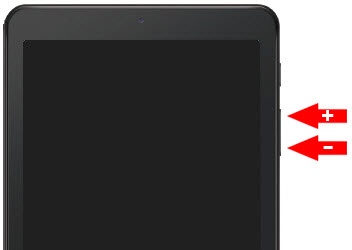
Volume buttons
(on the right edge) up (+) or down (-).