GizmoWatch™ - Power the Device On / Off
Here's how to turn your GizmoWatch on or off.
To better assist your customer, check out this emulator.
Do one of the following:
- To power on, press and hold thePower buttonon the Gizmo for 5 seconds or until you see the watch light up.
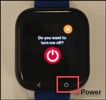
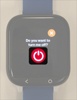
- To power off, press and hold thePower buttonuntil the screen to power off appears then tap thePower button.