GizmoHub App - Add Location Alerts
Here's how to add location alerts via the GizmoHub app.
- Ensure the GizmoHub app is updated (Google Play™ Store or Apple® App Store® ).
- Check out the GizmoHub FAQ page for more info.
Location-Based Alerts
- Open theGizmoHub app
.
If presented with the PIN screen, enter your PIN. - TapKids(lower-left).
- TapLocation alerts.
- TapAdd a location alert.
- TapLocation-based.Sends notifications when child's Gizmo moves in or out of a specified area.Does not apply to LG GizmoPal™
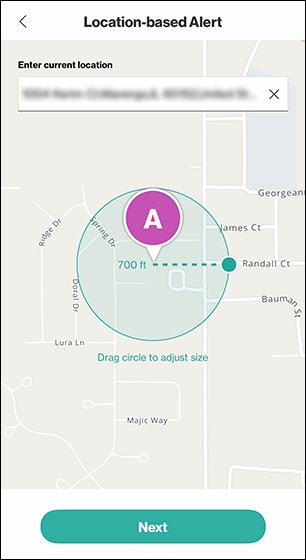
- Enter location in the top field, drag the circle to adjust boundary then tapNext.Search results populate for accuracy.
- In the 'Location name' field, type a description of the location (e.g., School, Home, etc.) then tapNext.
- Select a Start and End time in which you'd like to receive Location-based alerts (e.g., 7:00AM to 6:00PM).
- Select the days of the week you'd like to receive Location-based alerts.
- TapSave.
Time-Based Alerts
- Tap theGizmoHub appIf presented with the PIN screen, enter your PIN.
- TapKids(lower-left).
- TapLocation alerts.
- TapAdd a location alert.
- TapTime-based.Sends notifications during specific times of day.
- Choose one of the following options:
- Specific Time: Sends notifications at a certain time and day of the week.
- Time Range: Sends notifications throughout an entire range of dates and times.
- Enter time(s) and date(s) then tapSave.