Samsung Galaxy J3 V / Galaxy J3 (3rd Gen.) - Soft Reset
Here's how to restart your Galaxy J3 V / Galaxy J3 (3rd Gen.) if it crashes or resets, freezes or runs slow.
A soft reset can resolve issues like continuous resetting/rebooting, device crashing, freezing, device locks up, and keypad doesn't respond.
- A soft reset (turning the device off then back on) is similar to restarting a desktop computer and is one of the first steps in troubleshooting a device.
- In most cases, a soft reset won't affect data on the device, unless the battery is very low.
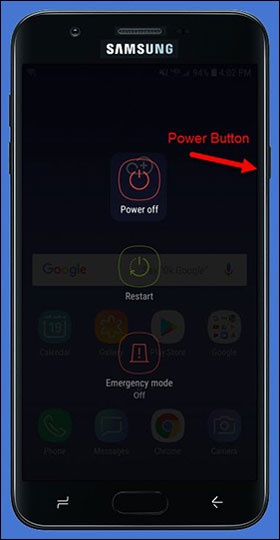
- Press and hold thePower button(on the right edge) until the Power off prompt appears then release.If the device is unresponsive/frozen, remove the battery.
- TapRestart.
- To confirm, tapRestart.Allow up to 90 seconds for the reset to complete.