Session status messages
Session Status

Due to inactivity, your session will end in approximately 2 minutes. Extend your session by clicking OK below.

Due to inactivity, your session has expired. Please sign in again to continue.

Samsung Galaxy J3 V / Galaxy J3 (3rd Gen.) - Capture a Screenshot

2026-10-23 00:14:59.858

Samsung Galaxy J3 V / Galaxy J3 (3rd Gen.) - Capture a Screenshot

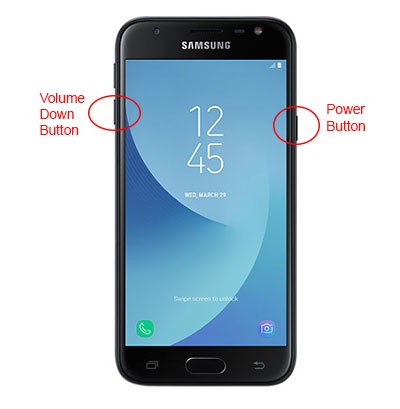
Here's how to capture a screenshot on your Galaxy J3 V / Galaxy J3.
  1. To capture a screenshot, press and hold the
    Power
    and
    Volume Down buttons
    at the same time.
    To view the screenshot you've taken, from a Home screen swipe up then tap
    Gallery
    Gallery icon.
    Power and Volume down buttons