Digital Secure App - Remove Unsafe Network from Trusted List
Here's how to remove an unsafe Wi-Fi network from your trusted list in the Digital Secure app.
- Open the Digital Secure app
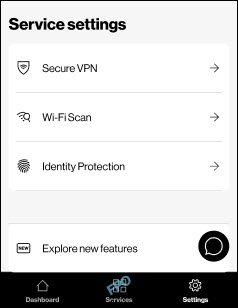
- Tap theSettings icon
(bottom-right).
- From the 'Service settings' section, tapWi-Fi Scan.
- TapTrusted Wi-Fi.
- From the list of Trusted Wi-Fi networks, tap theMore icon
to the right of the network name.
- TapRemove from trusted Wi-Fi.