One Talk T41S/SW, T42 Series IP Desk Phones - Park / Retrieve Call
Here's how to park and retrieve calls on your One Talk T41S/SW or T42 series IP Desk Phone.
Check out the One Talk simulator for a visual walkthrough of the park/retrieve process.
- Calls can only be parked to One Talk phone numbers or extensions in your group.
- You cannot use programmed Speed Dials on the desk phone to enter an extension or phone number when attempting to park a call.
- Notification is cancelled if the user makes an outbound call, receives an incoming call or 45 seconds passes and the call rings back to where it was parked from originally.
- Line 2 is used when parking a call
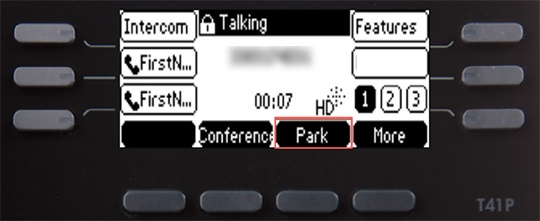
- While on an active call, press thePark soft key.The user hears a message stating "Please dial the number where you want to park your call followed by # or dial # to park the call against your number."
- Enter the appropriate 10-digit number or the extension number followed by #.Press#to park against your own extension.
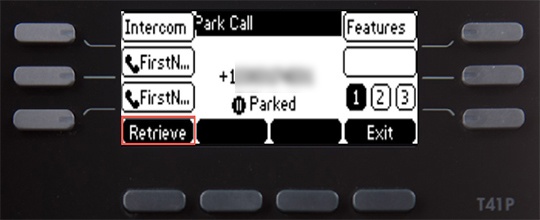
- To retrieve a parked call, press theRetrieve soft key.The user receives audio and visual notification of the parked call.The call can be retrieved by dialing FAC **88 + extension.