Kyocera DuraXV LTE - Adjust Brightness / Display Settings
Here's how to adjust screen brightness and other display settings (e.g., Clock, Font size, etc.) for your DuraXV LTE.
Follow these steps to adjust
brightness settings
and display / font settings
for your Kyocera DuraXV LTE.Adjust Brightness Settings
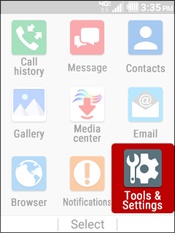
- From the main screen, selectMenu.Utilize the 5-way navigation pad to highlight and the center button to select.
- SelectTools and Settings.
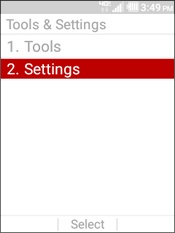
- SelectSettings.
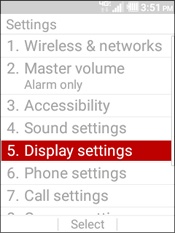
- SelectDisplay settings.
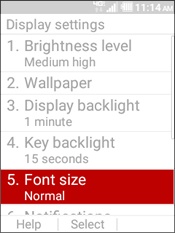
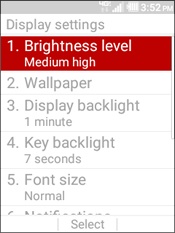
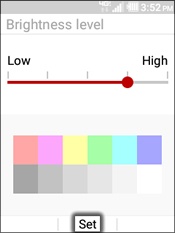
- SelectBrightness level.
- Adjust slider to preferred brightness level then selectSet.
Adjust Display / Font Settings
- From the main screen, selectMenu.Utilize the 5-way navigation pad to highlight and the center button to select.
- SelectTools and Settings.
- SelectSettings.
- SelectDisplay settings.
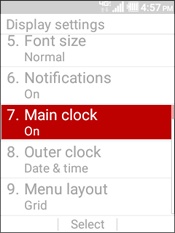
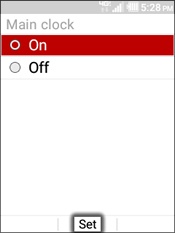
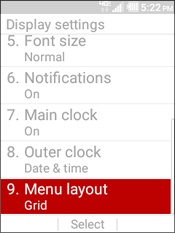
- SelectMain clock.
- Select an option (On / Off) then selectSet.
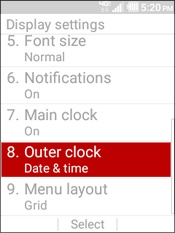
- SelectOuter clock.
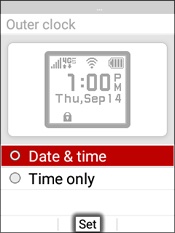
- Select an option the selectSet.
- Date and time
- Time only
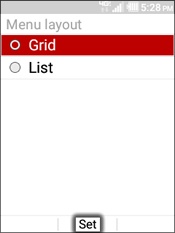
- SelectMenu layout.
- Select an option then selectSet.
- Grid
- List
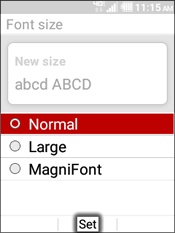
- SelectFont Size.
- Highlight an option (e.g., Normal, Large, etc.) then selectSet.