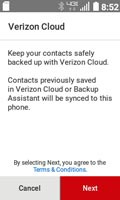
Verizon Cloud - 4G Basic Phone - Restore Contacts
Here's how to restore contacts on your 4G Basic phone.
- From the main screen, selectMenu.Utilize the 5-way navigation pad to highlight and the center button to select.
- SelectVerizon Apps.If unavailable, selectMedia center.
- SelectCloud.
- SelectNext.Backup will begin automatically.Contacts that have been backed up automatically restore.