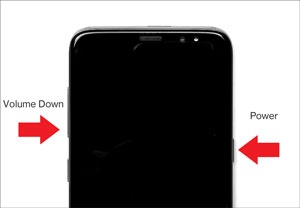
Samsung Galaxy S8 / S8+ - Capture a Screenshot
Here's how to capture a screenshot on your Samsung Galaxy S8 / S8+.
- To capture a screenshot, press thePower buttonand theVolume down buttonat the same time (for approximately 2 seconds)./To view the screenshot you've taken, swipe up or down from the center of the display on a Home screen then navigate:.GalleryScreenshots