Apple iPhone - Turn Calls From Other Devices On / Off (Continuity)
Here's how to make and receive calls on other Apple devices logged in to the same iCloud account.
- Continuity features connect Apple® iPhone® with your iPad®, iPod touch®, or Mac® so they can work together as one. You can use your iPad to make phone calls using the cellular connection from your iPhone. For additional Continuity functionality such as Handoff, view these product detail.
- You must be logged in to the same Wi-Fi network and using the same Apple ID among all your devices to use cellular calling; check out this info for additional Continuity requirements.
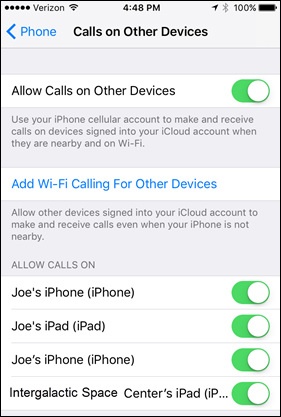
- From a Home screen, navigate:.SettingsPhoneIf an app isn't available on your Home screen, swipe left to access the App Library.
- TapCalls on Other Devices.
- Tap theAllow Calls on Other Devices switchto turn on
or off
.
For first-time setup, tapAdd Wi-Fi Calling For Other Devicesto enable other iCloud® devices to make and receive calls. - From the 'Allow Calls On' section, tap the switches to turn to call for that device on or off.