Session status messages
Session Status

Due to inactivity, your session will end in approximately 2 minutes. Extend your session by clicking OK below.

Due to inactivity, your session has expired. Please sign in again to continue.

Windows 10 - View Phone Number

2026-10-22 20:02:16.759

Windows 10 - View Phone Number

Here's how to view the mobile number for your Windows 10.
If your device isn't running Windows® 10, refer to the Windows 8 instructions.
  1. From the Windows desktop, navigate:
    Start Start menu icon
    Settings icon
    .
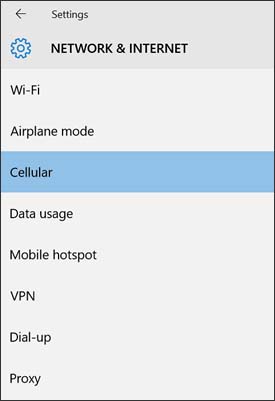
  2. From the left-pane, select
    Cellular
    .
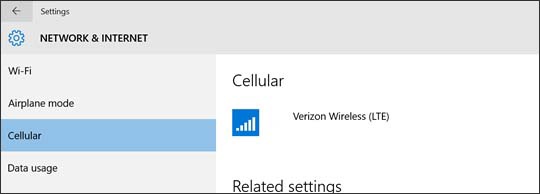
  3. From the Cellular section, if necessary, select
    Verizon Wireless (LTE)
    .
    Cellular section with Verizon Wireless connection
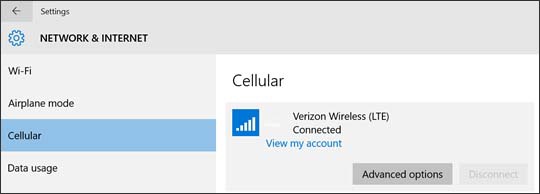
  4. Select
    Advanced options
    .
    Verizon Wireless connection with Advanced options
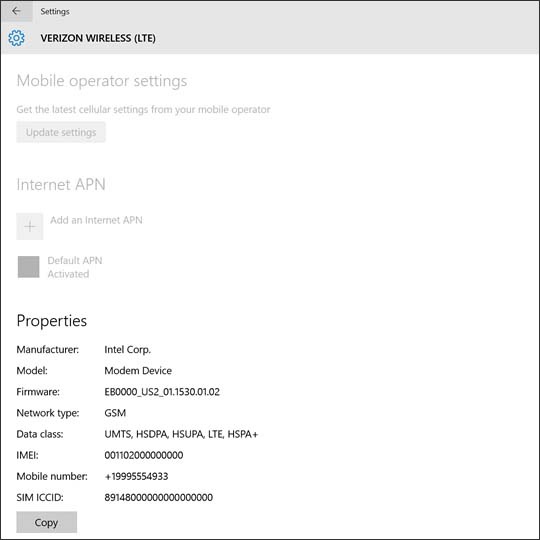
  5. From the Properties section, view the Mobile number.
    The available info may vary.
    Advanced properties