Apple iPhone - Turn Screen Portrait Orientation Lock On / Off
Here's how to fix your screen/display on your iPhone if it doesn't flip or rotate.
Screen Portrait Orientation mode displays content in landscape (horizontal) or portrait (vertical) and isn't available for all apps. Simply turn your Apple® iPhone® to change the view.
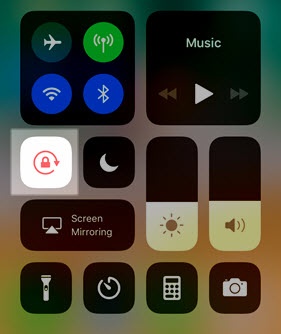
- Access the Control Center by swiping downward from the upper-right corner of the Home or Lock screen.For the iPhone with Touch ID, access the Control Center by touching the bottom of any screen then dragging upward.
- Tap thePortrait Orientation iconto lock or unlock screen portrait orientation.When the icon is highlighted in white, the screen is locked into portrait orientation mode.The Control Center screen may vary slightly depending on the device model.